Appearance
如何在灵犀易算云平台获取MATS软件请查看附件一
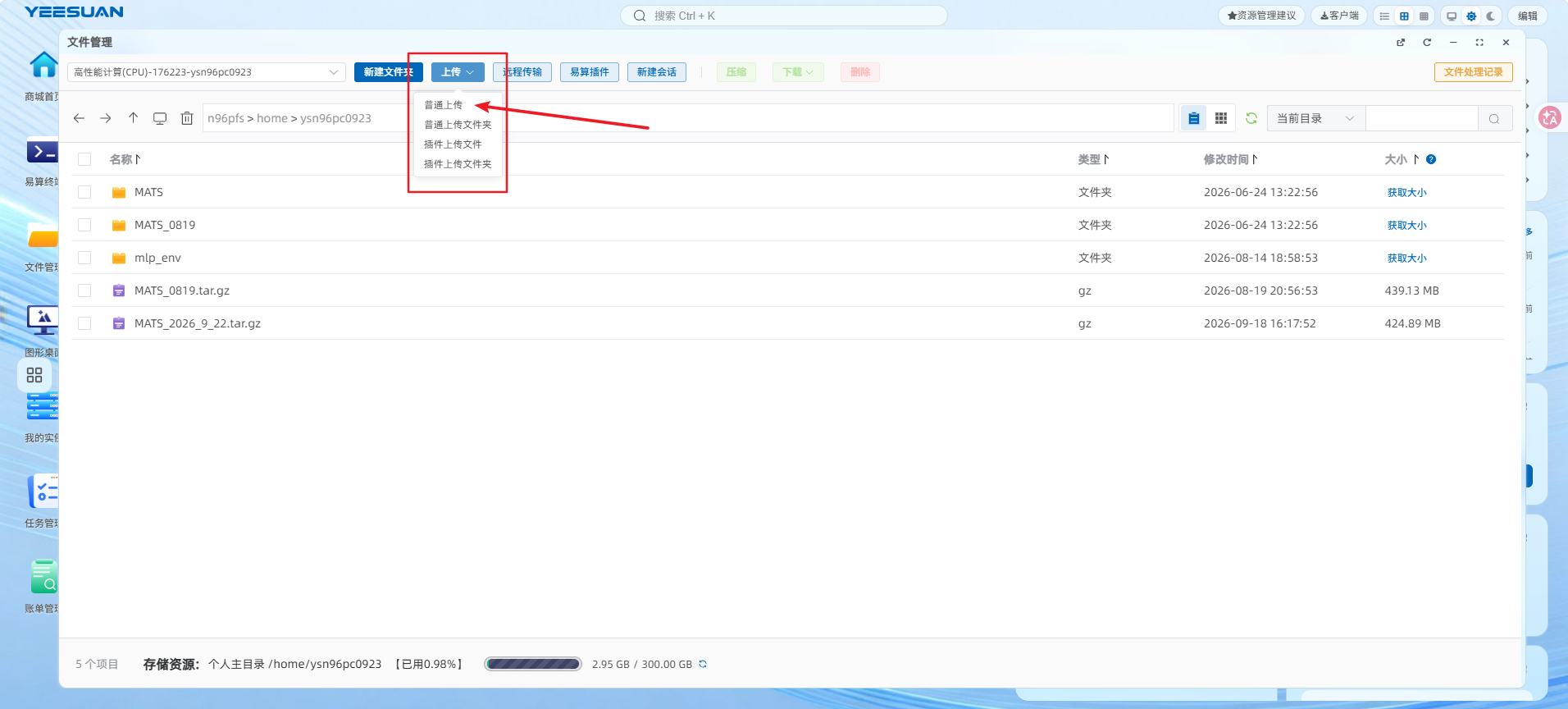
将案例上传灵犀易算云请查看附件二
一、加载环境
bash
module load mats/1.1拷贝案例文件:MATS_2026_9_22.tar.gz到自己灵犀易算云账号上()
解压命令:
bash
tar -xzf MATS_0922_1.tar.gz二、进入案例目录
登录灵犀易算云账号后,通过浏览器终端或 SSH 连接至登录节点,进入案例目录:
bash
cd ~/MATS/目录结构:
plain
~/MATS/
├── mats-dft/
│   └── 1-SCF/input/      # DFT 计算(ares.cell, ares.in, ares.kpoints, *.upf, sub.sh)
├── mats-mlp/
│   ├── step01_ares2extxyz/   # DFT结果转extxyz
│   ├── step02_get_train_set/ # 自动化数据采集
│   └── step03_train/         # 势函数训练
└── mats-md/
    └── nicr/                 # NiCrFe合金NVT模拟
三、DFT 第一性原理计算流程
进入案例目录
bash
cd ~/MATS/mats-dft/1-SCF/input
ls
# ares.cell  ares.in  ares.kpoints  Rb.upf  B.upf  C.upf  sub.sh
提交计算任务
脚本内容(sub.sh):
bash
#!/bin/bash
#SBATCH --job-name=scf
#SBATCH --nodes=1
#SBATCH --ntasks-per-node=64
#SBATCH --time=2:00:00
#SBATCH --cpus-per-task=1
#SBATCH --partition=cn
#SBATCH --output=scf_%j.out

export MKL_NUM_THREADS=1
export OMP_NUM_THREADS=1
export MKL_DYNAMIC=false

mpirun -np 64 /n96pfs/software/public/mats/1.1/bin/mats-dft
提交命令:
bash
sbatch sub.sh查看状态:
bash
squeue -u $USER实时查看输出:
bash
tail -f scf_*.out参数说明
| 参数 | 含义 |
|---|---|
| mpirun | MPI 程序启动器(必须使用) |
| -np 64 | 使用 64 个并行进程 |
| --partition=cn | 灵犀易算云计算分区名 |
| MKL_NUM_THREADS=1 / OMP_NUM_THREADS=1 | 限制线程数,避免与 MPI 竞争,否则计算速度会明显变慢 |
输入文件说明
| 文件名 | 含义 |
|---|---|
| ares.cell | 晶体结构文件(晶格参数、原子坐标,Rb₂B₆C₆ 14原子) |
| ares.in | DFT 计算参数(PBE泛函、截断能90Ry、收敛阈值1e-7) |
| ares.kpoints | 布里渊区 k 点采样设置(8×8×8) |
| *.upf | 模守恒赝势文件(每个元素一个) |
计算过程说明
程序输出内容包括:
- SCF 自洽迭代过程(每步能量、密度误差、耗时)
- 最终总能量与压强
- 各原子受力
示例:
plain
|   ITER |         ETOT/eV |        EDIFF/eV |            DRHO |          TIME/s |
|--------|-----------------|-----------------|-----------------|-----------------|
|      1 |   -2.658152e+03 |    0.000000e+00 |    3.350962e+00 |       67.605976 |
|     15 |   -2.676047e+03 |   -1.076967e-06 |    5.715655e-09 |       10.953983 |
TOTAL-PRESSURE: 86.622367  GPa
Total  Time :      0 h 4 mins 20 secs
四、MLP 势函数训练流程
案例概述
本次 mats-mlp 案例包含三个核心功能,彼此独立:
a. step01_ares2extxyz 案例:从 mats-dft 的计算结果中提取结构信息,输出为 .extxyz 格式;
b. step02_get_train_set 案例:自动化数据采集流程(Materials Project 抓取、变形、微扰、P-V拟合),输出训练数据集 .extxyz 格式;
c. step03_train 案例:根据训练集训练机器学习势函数模型,输出势函数 pot.PhyMLP。
环境准备
关键:必须用 Python 3.11,系统默认 Python 3.9 会导致 pymatgen 版本不兼容。
加载 Python 3.11 模块:
bash
module load bio-python/3.11-2026.07.24
python3 --version    # 应显示 3.11.x
创建虚拟环境并安装依赖:
bash
cd ~/MATS/mats-mlp
python3 -m venv ~/mlp_env
source ~/mlp_env/bin/activate
pip install phymlp_kit-1.5.0.post0814-py3-none-any.whl
pip install pymatgen==2025.4.24 mp-api==0.45.4 emmet-core==0.84.7rc1 maggma==0.71.5
pip install numpy ase scipy pandas dscribe dpdata
说明:
phymlp_kit-1.5.0.post0814-py3-none-any.whl是已修复 MPID 校验问题的版本,可直接安装使用,无需再手动打补丁。
参数说明
| 参数 | 含义 |
|---|---|
| Python 3.11 | 必须使用,系统默认 Python 3.9 会导致 pymatgen 版本不兼容,否则出现 cannot import name 'SymmetryUndeterminedError' |
| 锁定版本 | pymatgen0.45.4 等必须精确匹配,否则出现 Invalid MPID Format 报错 |
MLP 任务一:step01 从 DFT 计算输出结构
bash
cd ~/MATS/mats-mlp/step01_ares2extxyz
phymlp-kit ares2extxyz --ares2extxyz_input ./SiC-scf
预期输出:
plain
INFO: 找到 1 个 ares_output.dat 文件
INFO: 成功将 1 个结构写入 train.extxyz
MLP 任务二:step02 自动化数据采集
step02 的 from_mp_structures 依赖 mp-api,使用 wheel(phymlp_kit-1.5.0.post0814)即可正常抓取 MP 数据,无需手动打补丁。然后执行完整流程:
bash
cd ~/MATS/mats-mlp/step02_get_train_set
bash run.sh       # 一键执行全流程(各步骤用 && 串联,任一步失败即停止)
run.sh 中的各步骤与说明如下:
| 步骤 | 命令 | 说明 |
|---|---|---|
| 1 从 MP 抓取结构 | phymlp-kit from_mp_structures --input_file input.yaml | 抓取基础+表面结构 |
| 2 晶格变形 | phymlp-kit deform_structures --input_file input.yaml | 0.8~1.2 倍缩放 |
| 3 原子微扰 | phymlp-kit perturb_structures --input_file input.yaml | 生成微扰结构 |
| 4 dump 转 POSCAR | phymlp-kit dump_to_poscar --input_file input.yaml | LAMMPS 轨迹转换 |
| 5 生成 VASP 输入 | phymlp-kit setup_vasp --input_file input.yaml | POTCAR 缺失正常 |
| 6 提交 VASP 计算 | phymlp-kit submit_vasp --input_file input.yaml | 默认注释;确认集群 VASP 环境后放开 |
| 7 汇总变形结果 | phymlp-kit process_deform --input_file input.yaml | 生成 a_V_E_P.txt,建立 scale_0.8~1.2 符号链接 |
| 8 Birch-Murnaghan 拟合 | phymlp-kit birch_murnaghan --input_file input.yaml | 输出拟合曲线,收集 OUTCAR_scale 参考结构 |
| 9 P-V 拟合 | phymlp-kit exp_pv_structures --input_file input.yaml | 实验数据拟合 |
| 10 生成 extxyz | phymlp-kit generate_extxyz --input_file input.yaml | 汇总训练集 |
注:VASP 计算(步骤 5、6)需在具备 VASP 的集群环境执行;未运行 VASP 时步骤 7、8 无对应数据(属正常),P-V 拟合路径仍可生成训练集。
step02 运行结果
| 步骤 | 结果 |
|---|---|
| from_mp_structures | 8 个基础结构 + 24 个表面结构 |
| deform_structures | 40 个变形结构(8 × 5 缩放系数) |
| perturb_structures | 100 个微扰结构 |
| setup_vasp | 生成各缩放结构的 VASP 输入 |
| process_deform | 各体系 a_V_E_P.txt + scale_0.8~1.2 符号链接 |
| birch_murnaghan | 各体系拟合结果(fitted_data.csv,1000 点)+ OUTCAR_scale |
| exp_pv_structures | P-V 拟合数据(fit_a_P.data) |
| generate_extxyz | 汇总训练集 |
最终训练集构成(示例,具体数值随算例与环境不同):
plain
VASP structures: 10
Birch-Murnaghan structures: 25
Fit_a_P structures: 200
Total structures: 235
输出文件:
plain
./Extxyz_set/vasp/vasp.extxyz
./Extxyz_set/birch_murnaghan_fitting/birch.extxyz
./Extxyz_set/fit_a_P/fit_a_P.extxyz
./Extxyz_set/merged_dataset.extxyz
MLP 任务三:step03 势函数训练
进入案例目录并提交训练任务:
bash
cd ~/MATS/mats-mlp/step03_train
sbatch sub.sh
可以查看程序是否运行结束:
bash
squeuesub.sh 脚本内容:
bash
#!/bin/bash
#SBATCH --job-name=mlp
#SBATCH --nodes=1
#SBATCH --ntasks-per-node=16
#SBATCH --time=12:00:00
#SBATCH --cpus-per-task=1
#SBATCH --partition=cn
#SBATCH --output=mlp_%j.out

export MKL_NUM_THREADS=1
export OMP_NUM_THREADS=1
export MKL_DYNAMIC=false

mpirun -np 16 /n96pfs/software/public/mats/1.1/bin/mats-mlp train ./10.PhyMLP ./train.extxyz --save_to=./pot.PhyMLP --iteration_limit=5000 --al_mode=nbh
参数说明
| 参数 | 含义 |
|---|---|
| mats-mlp | 启动 MATS 机器学习势函数训练模块 |
| train | 执行势函数训练任务 |
| 10.PhyMLP | MLP 势函数模型配置文件 |
| train.extxyz | 训练数据集文件(包含构型、能量、力等信息) |
| --save_to=./pot.PhyMLP | 指定训练后势函数输出路径 |
| --iteration_limit=5000 | 设置最大训练迭代次数 |
| --al_mode=nbh | 设置主动学习模式为邻域模式(nbh) |
输入与输出文件说明
| 文件名 | 含义 |
|---|---|
| 10.PhyMLP | MLP 势函数模型配置文件(输入) |
| train.extxyz | 训练数据集文件(输入) |
| pot.PhyMLP | 训练完成的机器学习势函数模型文件(输出) |
训练过程说明
程序运行过程中将输出:
- 势函数训练迭代信息
- 能量与力误差变化
- 主动学习状态信息
- 模型收敛情况
训练完成后自动生成势函数文件 pot.PhyMLP,误差报告示例:
plain
_________________Errors report_________________
Energy per atom:
    RMS absolute difference = 0.001301 eV/atom
Forces:
    RMS absolute difference = 0.140114 eV/Å
_______________________________________________
training complete
五、分子动力学(MD)模拟流程
进入 MD 示例目录:
bash
cd ~/MATS/mats-md案例一:多元 NiCrFe 合金体系(NVT 模拟)
进入案例目录(先建输出目录,必须):
bash
cd ~/MATS/mats-md/nicr
mkdir -p dump-nicr
输入文件
| 文件名 | 含义 |
|---|---|
| config-nicr.yaml | NiCrFe 分子动力学模拟配置文件(NVT 300K 5000步) |
| pot-nicr.mtp | NiCrFe 多元体系机器学习势函数 |
运行命令(脚步sub.sh内容)
bash
#!/bin/bash
#SBATCH --job-name=md-nicr
#SBATCH --nodes=1
#SBATCH --ntasks-per-node=16
#SBATCH --time=2:00:00
#SBATCH --cpus-per-task=1
#SBATCH --partition=cn
#SBATCH --output=md_nicr_%j.out

export MKL_NUM_THREADS=1
export OMP_NUM_THREADS=1
export MKL_DYNAMIC=false

mpirun -np 16 /n96pfs/software/public/mats/1.1/bin/mats md -c config-nicr.yaml
提交命令:
bash
sbatch sub.sh六、常见问题
| 问题 | 原因 | 解决方案 |
|---|---|---|
| command not found | 未使用完整路径 | 使用 /n96pfs/software/public/mats/1.1/bin/ 下的完整路径 |
| There are not enough slots | 登录节点直接运行 mpirun | 必须通过 sbatch 提交到计算节点 |
| Failed to open file for parallel writing | 输出目录不存在 | mkdir -p dump-nicr 创建输出目录 |
| No module named 'xxx' | 依赖包未安装 | pip install <包名> 安装缺失依赖 |
| cannot import name 'SymmetryUndeterminedError' | 用 Python 3.9 而非 3.11 | module load bio-python/3.11 重建环境 |
| Invalid MPID Format mp-aaaaaadn | mp-api pydantic 严格校验占位 MPID | 使用已修复 wheel(post0814 版) |
| no Route matched with those values | MP API 端点格式错误 | 用 mp-api 客户端本身,不要手工拼 URL |
| Structure.from_dict 报 list indices 错误 | structure 字段已是 Structure 对象 | 直接 doc["structure"],无需 from_dict 转换 |
附件一:在灵犀易算云平台获取MATS软件
1.通过https://www.yeesuan.com/shop/home登录灵犀易算云官网
 点击右上角的注册/登录按钮进行注册或者登录
2.点击首页的“算力市场”选择Intel 6966P-CPU2401这个算力
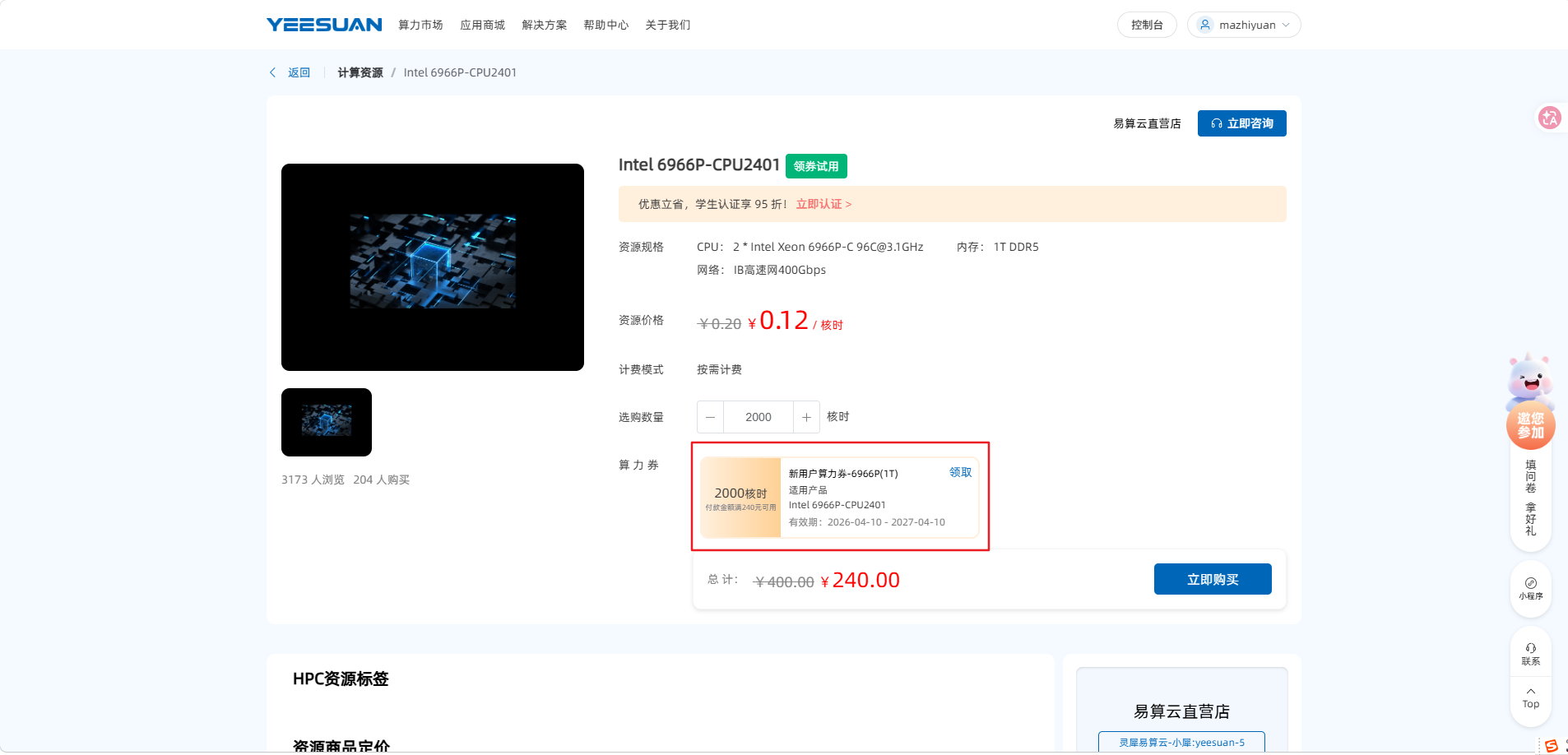
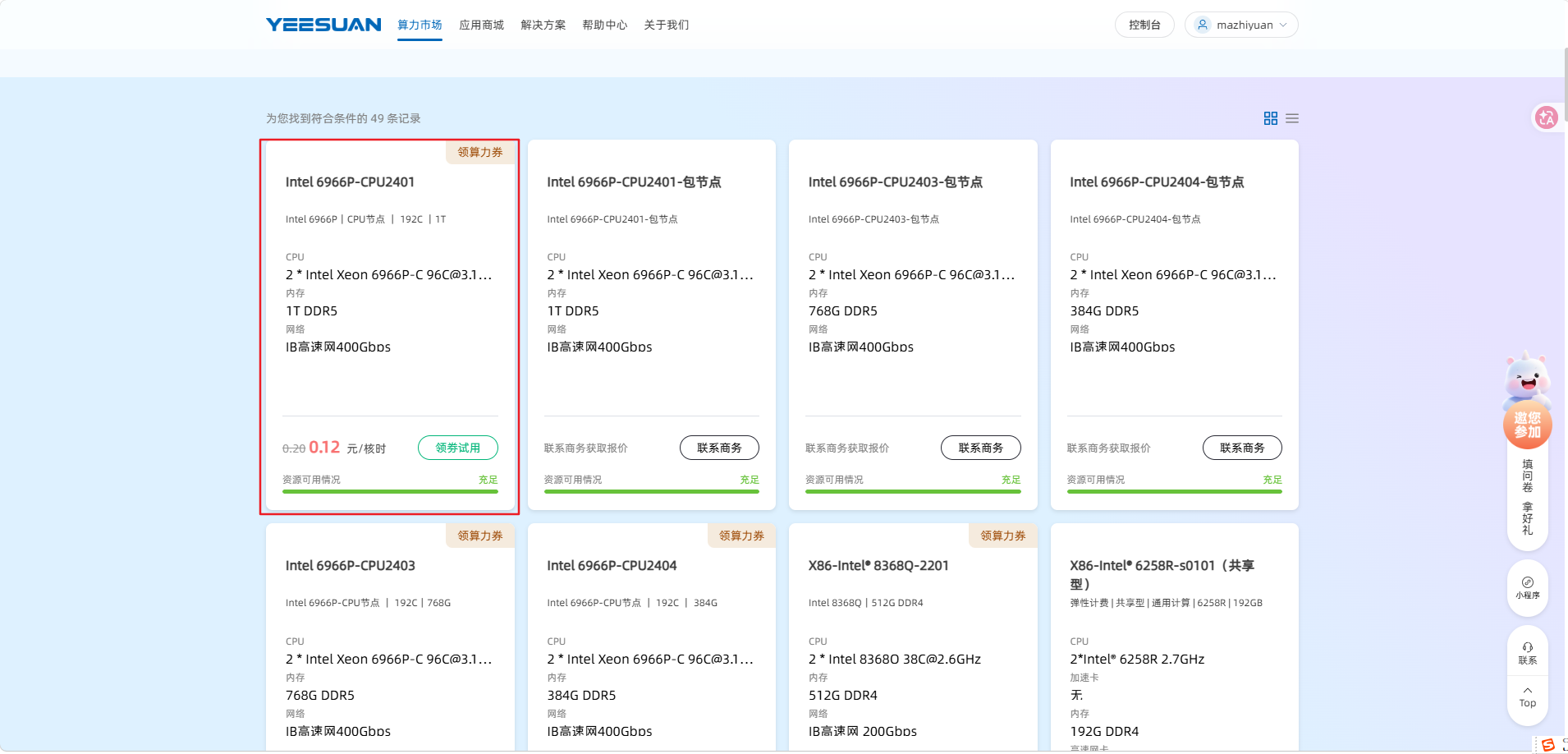 点击领券使用,领取2000核时的算力券。
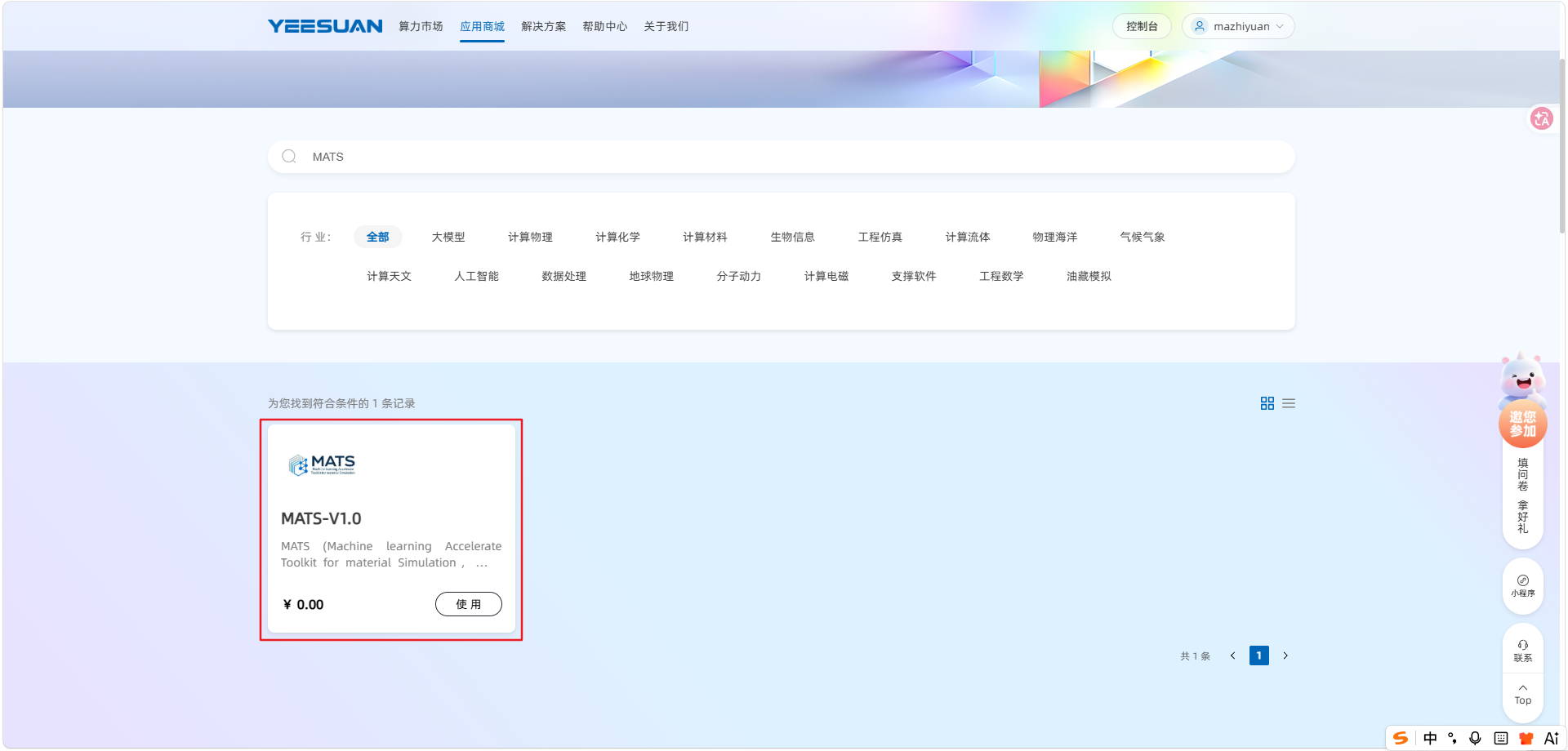
3.点击首页的“应用商城”输入我们的软件名称“MATS”即可找到我们的软件
4.通过上述领券的2000核时的算力券进行购买
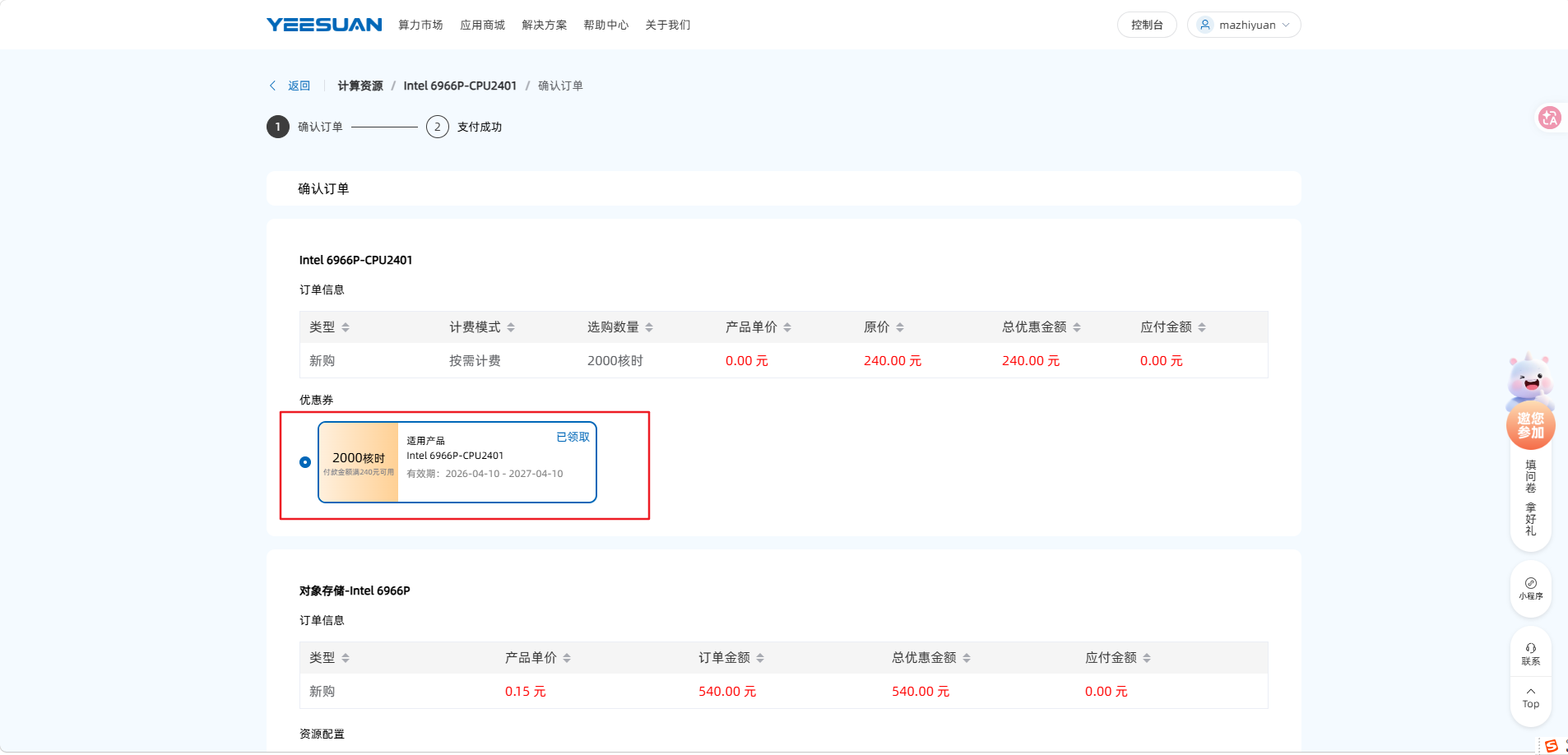
5.购买成功后,点击右上角的控制台进入
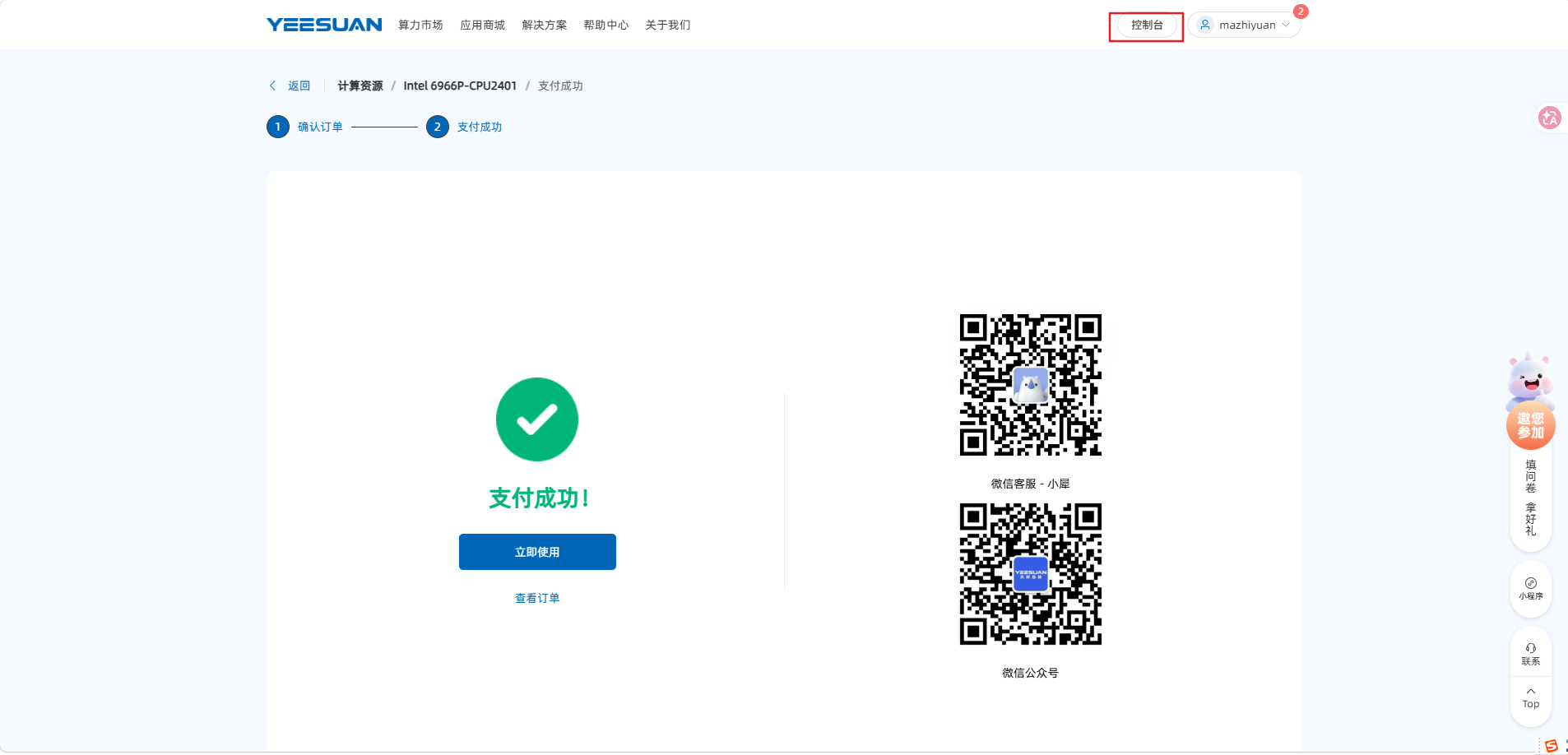
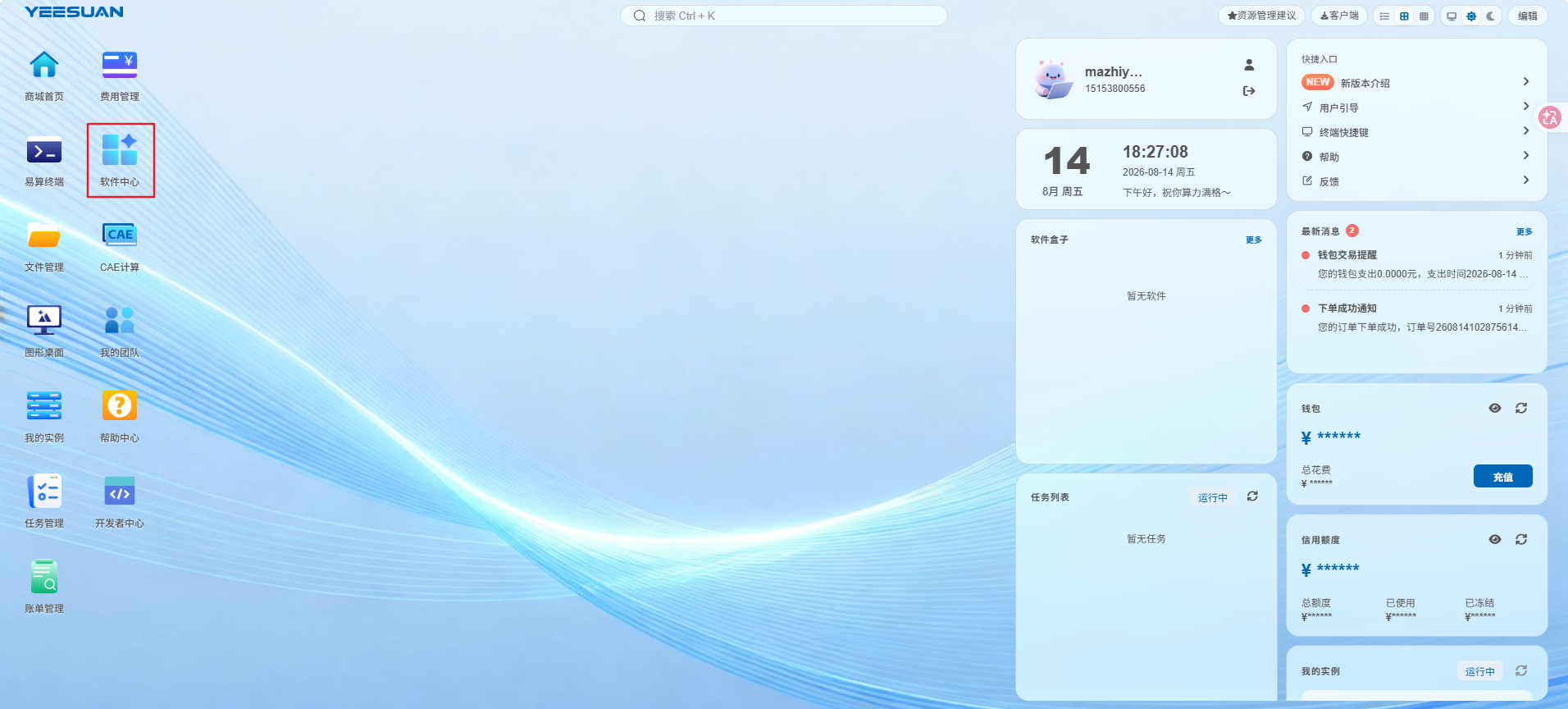
6.进入后点击软件中心即可按照我们提供的MATS软件使用手册操作即可
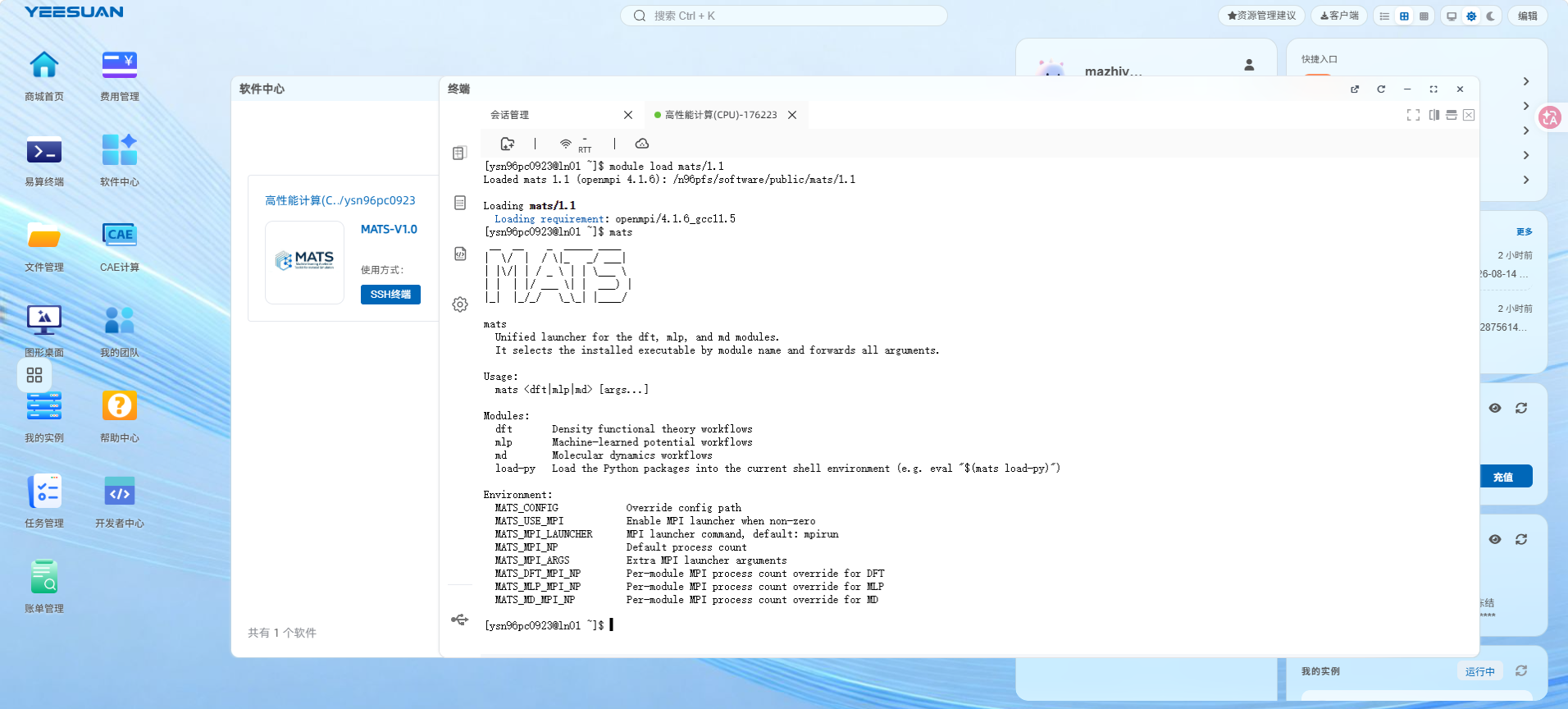

2.切换到我们购买的资源上
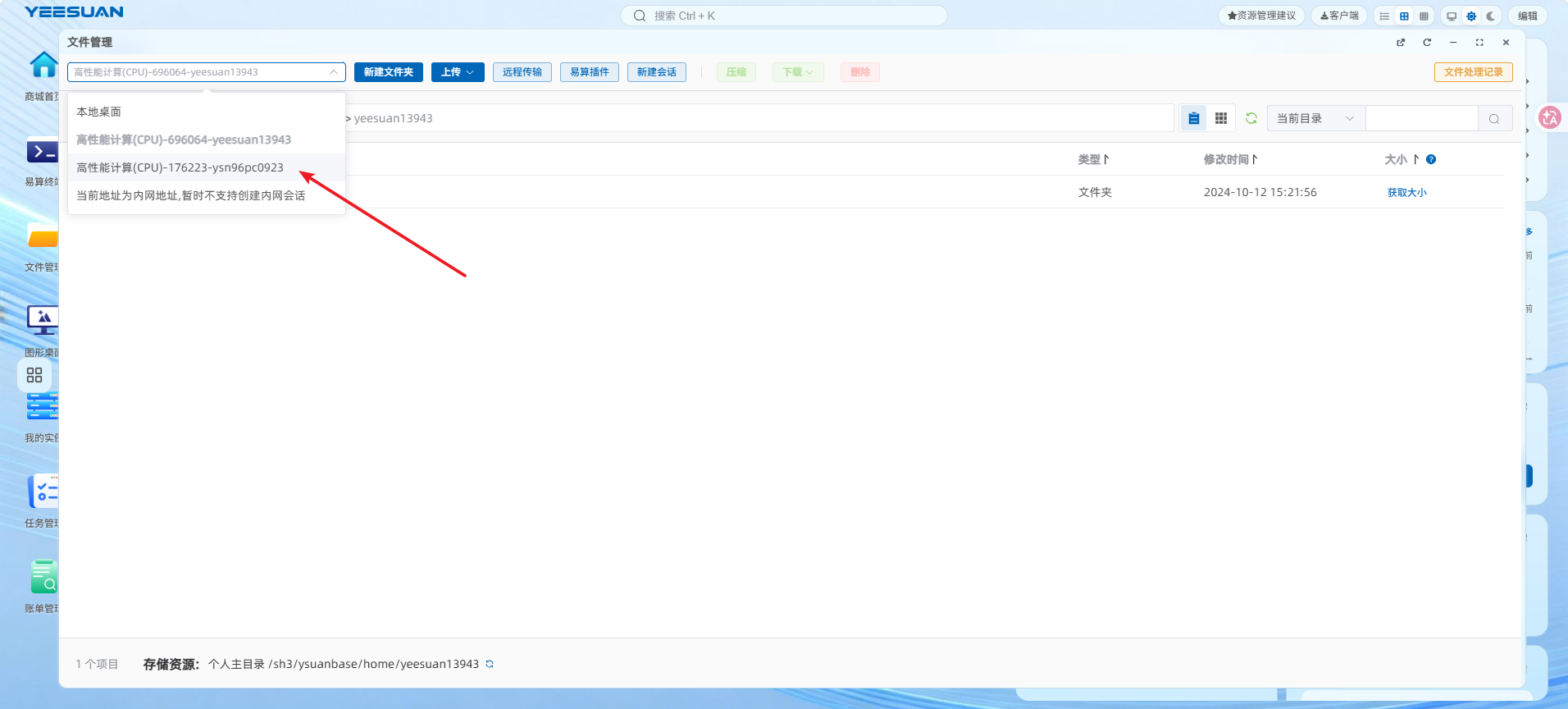
3.点击上传当中的普通上传,上传案例后按照手册执行即可